In AIX environments, administrators often need to create a copy of a volume group for backup, testing, migration, or recovery purposes without impacting production workloads.
AIX Logical Volume Manager (LVM) provides two powerful commands to achieve this safely:
- mirrorvg
- splitvg
This article explains how mirrorvg and splitvg work together, their prerequisites, internal behavior, and how they can be safely used in production systems.
1. What is Mirroring in AIX
Mirroring in AIX means maintaining multiple copies of each logical partition (LP) on different physical disks.
This provides protection against disk failure and is a fundamental requirement for using splitvg.
- mirrorvg creates redundancy, not a backup.
- splitvg does not copy data; it detaches an existing mirror copy.
- Without mirroring, splitvg has nothing to split.
2. mirrorvg: Prepare and Extend the Volume Group
Before mirroring a volume group, ensure:
- A free disk is available.
- Disk size is equal or larger than existing disks.
- Disks are on separate adapters or paths if possible.
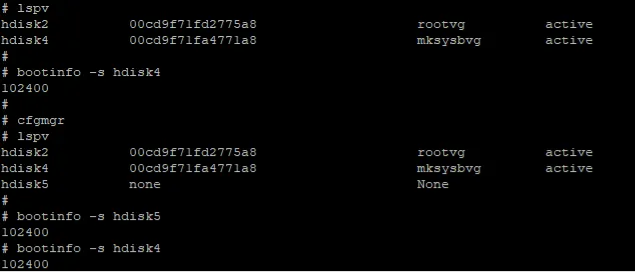
Example:
extendvg mksysbvg hdisk5During extension, the following issue was encountered:
0516-1980 extendvg:
Block size of all disks in the volume group must be the same.
Cannot mix disks with different block sizes.
Root Cause
The existing VG was using 4096-byte block size while the new disk was configured with 512-byte block size.
AIX does not allow mixing disks with different physical block sizes in the same volume group.
Resolution
- Use disks with identical block sizes.
- Provision a matching 4096-byte disk.
- Or keep the 512-byte disk in another VG.
After adding a compatible disk:
extendvg oravg hdisk53. mirrorvg: Mirror the Volume Group
Mirror all logical volumes:
mirrorvg oravg hdisk5Verify mirror copies:
lsvg -l oravg
lslv -m lvname
Check for stale partitions:
lsvg oravgSince no stale partitions were found, syncvg was not required.
4. splitvg
The splitvg command:
- Identifies one mirror copy of each LP.
- Detaches those disks from original VG.
- Creates a new VG from detached mirrors.
Example:
splitvg -y orabkpvg oravgAfter split:
- One mirror copy is removed from oravg.
- Detached disks form orabkpvg.
- Data remains identical at split time.
Independent Volume Group Option
splitvg -y orabkpvg -i oravgUseful for migration or offline backup.
5. joinvg: Rejoining the Volume Group
If split temporarily, rejoin using:
joinvg datavgThis reattaches mirrors and resynchronizes data.
- Unmount split VG filesystems.
- Ensure no data divergence occurred.
6. Common Use Cases
- Offline backup without downtime
- Volume group migration
- rootvg/datavg cloning
- DR drills and validation
- Safe production testing
7. Key Takeaways
- splitvg is not a backup replacement.
- Always verify mirror placement.
- Ensure application consistency.
- Document disk ownership.
- Avoid writes to both VGs after split.
mirrorvg and splitvg together provide a powerful mechanism for redundancy and cloning in AIX environments.
Proper planning and validation are essential to avoid inconsistency and operational risks.
Conclusion
When properly implemented, mirrorvg and splitvg allow administrators to create point-in-time copies of data with minimal disruption, making them extremely useful for backup, migration, and DR operations.