What You'll Learn
- Why upgrading Sendmail is necessary in many AIX environments.
- Differences between the native AIX Sendmail and the AIX Toolbox version.
- How to verify the currently installed Sendmail version.
- How to determine whether Sendmail supports SASL and TLS.
- Required packages before installation.
- Preparing the system for authenticated SMTP relay configuration.
Prerequisites
This article assumes you already understand the concepts covered in the previous articles. Before continuing, you should be familiar with:
- Email Architecture in AIX.
- Mail User Agent (MUA).
- Mail Transfer Agent (MTA).
- SMTP.
- Sendmail Architecture.
1. Why Upgrade Sendmail?
One of the most common questions asked by AIX administrators is:
"If Sendmail is already installed on AIX, why do we need another version?"
The answer lies in how enterprise email systems have evolved over the years.
Traditional SMTP servers often accepted mail from trusted hosts without requiring authentication. Modern email providers—including Amazon Simple Email Service (AWS SES), Microsoft Exchange Online, and many enterprise SMTP gateways—require authenticated SMTP sessions protected with TLS encryption.
While IBM AIX includes Sendmail by default, older releases or older compiled binaries may not include the features required for modern SMTP authentication, such as SASL or STARTTLS. The availability of these capabilities depends on the Sendmail build and the AIX release in use.
Instead of modifying an outdated binary, administrators commonly install the latest Sendmail package from the AIX Toolbox, which provides support for modern authentication mechanisms and newer library dependencies.
Older Sendmail

      SMTP

        |

        +-------> No SMTP AUTH

        +-------> Limited TLS Support

        +-------> Not Suitable for Modern SMTP Relays

AIX Toolbox Sendmail

      SMTP

        |

        +-------> SMTP AUTH

        +-------> SASL Support

        +-------> STARTTLS

        +-------> Enterprise SMTP Relay Ready
The objective of upgrading Sendmail is not simply to obtain a newer version. The primary goal is to enable compatibility with modern authenticated SMTP relay services such as AWS SES while maintaining secure communication through TLS.
2. Native AIX Sendmail vs AIX Toolbox Sendmail
Although both packages perform the same role as a Mail Transfer Agent, their capabilities can differ depending on the version and build options.
| Feature | Native AIX | AIX Toolbox |
|---|---|---|
| SMTP | ✔ | ✔ |
| TLS Support | Depends on Version | ✔ |
| SASL Authentication | May Not Be Available | ✔ |
| Modern SMTP Relay Support | Limited on Older Builds | ✔ |
| RPM Based | No | ✔ |
For environments integrating with AWS SES or other authenticated SMTP providers, the AIX Toolbox version is generally the preferred choice because it includes support for the features expected by modern email infrastructure.
3. Check the Existing Installation
Before installing or upgrading Sendmail, it's important to determine what is already installed on the system.
Start by locating the Sendmail executable.
which sendmail

Next, verify whether an RPM-based version is already installed.
rpm -qa | grep sendmail
If the native IBM package is installed, it can be identified using:
lslpp -L | grep sendmail
Finally, record the current AIX level.
oslevel -s

Documenting the existing environment before making changes simplifies troubleshooting and provides a rollback reference if required.
Always collect version information before upgrading software on a production server. Knowing the existing Sendmail version, package source, and AIX level helps verify compatibility with newer packages and simplifies rollback planning.
4. Verifying Sendmail Build Features
Before upgrading or configuring Sendmail, you should first understand the capabilities of the currently installed binary. Not every Sendmail build is compiled with the same features, and the availability of options such as SASL authentication or STARTTLS depends on how the binary was built.
Fortunately, Sendmail provides a simple way to display its compiled features.
sendmail -d0.1 -bv root
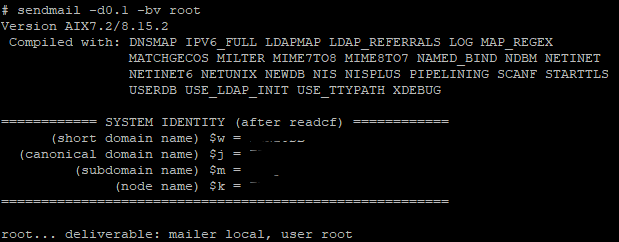
This command prints detailed version information, build options, and compile-time features without actually sending an email.
A typical output may contain information similar to the following.
Version 8.17.x

Compiled with:

DNSMAP

MILTER

MIME7TO8

PIPELINING

STARTTLS

SASLv2

TCPWRAPPERS

USERDB
These compile-time options indicate the functionality available in the installed Sendmail binary.
| Feature | Description |
|---|---|
| STARTTLS | Supports encrypted SMTP communication using Transport Layer Security (TLS). |
| SASLv2 | Enables SMTP authentication using the Cyrus SASL library. |
| DNSMAP | Allows DNS lookups for mail routing. |
| MILTER | Provides support for mail filtering applications. |
| PIPELINING | Improves SMTP performance by reducing protocol round trips. |
If your Sendmail binary does not include SASLv2 and STARTTLS, it will not be able to authenticate with most modern SMTP providers such as AWS SES or Microsoft Exchange Online.
5. Understanding Package Dependencies
Modern Sendmail relies on several supporting libraries. These libraries provide functionality such as authentication, encryption, database lookups, and directory services.
Before installing the latest Sendmail package, ensure that the required dependencies are available on your system.
| Package | Purpose |
|---|---|
| cyrus-sasl | Provides SMTP authentication using SASL mechanisms. |
| openssl | Enables TLS encryption for secure SMTP communication. |
| db | Used by Sendmail for aliases and internal database files. |
| openldap | Provides LDAP-related libraries required by some Sendmail builds. |
| libgcc | Runtime support library required by many GCC-compiled packages. |
These packages work together to provide the functionality expected by modern enterprise email environments.
During our implementation, installing the latest Sendmail package required additional RPM dependencies such as db, openldap, libgcc, and cyrus-sasl. Resolving these dependencies before installation avoided repeated installation failures and simplified the deployment process.
6. Installation Methods
There are two common approaches for installing Sendmail from the AIX Toolbox.
Method 1 – Online Installation
If the server has Internet connectivity and the DNF repository is configured, packages can be installed directly from the AIX Toolbox repositories.
dnf install sendmail
DNF automatically resolves most package dependencies, making this the simplest installation method.
Method 2 – Offline Installation
Many production AIX servers do not have Internet access because of organizational security policies. In these environments, administrators typically download the required RPM packages on another system and transfer them to the target server.
The installation is then performed locally using the RPM utility.
rpm -Uvh package-name.rpm
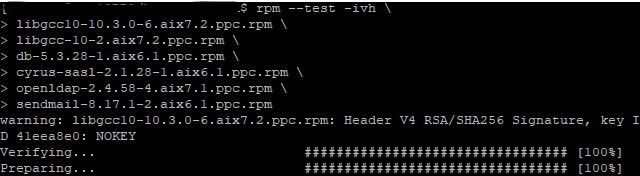
Although this method requires additional preparation, it is the standard approach in highly secured enterprise environments.
Always download all required dependency packages before beginning an offline installation. Installing packages one at a time often results in repeated dependency errors and unnecessary troubleshooting.
7. Installing Sendmail
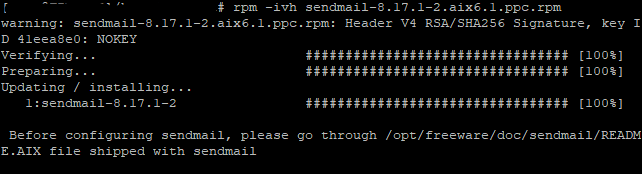
After verifying the existing environment and collecting all required dependencies, the latest Sendmail package can be installed.
If upgrading an existing RPM installation, use the following command.
rpm -Uvh sendmail-*.rpm

If the package is not already installed, the installation command remains the same.
During installation, carefully review the output for dependency warnings or conflicts. Installation should complete successfully without unresolved package requirements.
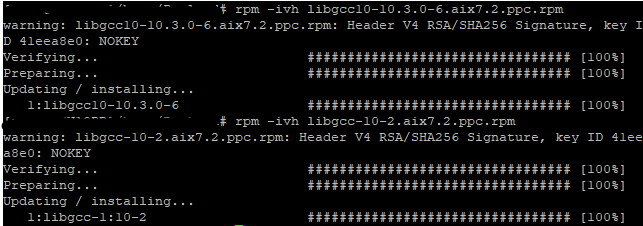
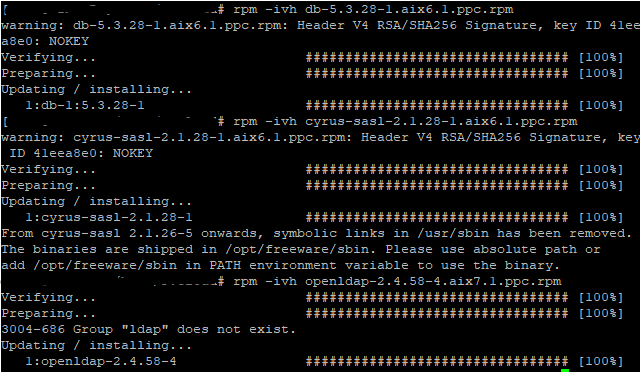
Avoid performing your first Sendmail installation directly on a production server. Whenever possible, validate the installation on a development LPAR or test environment before deploying it to production.
8. Verifying the Installation
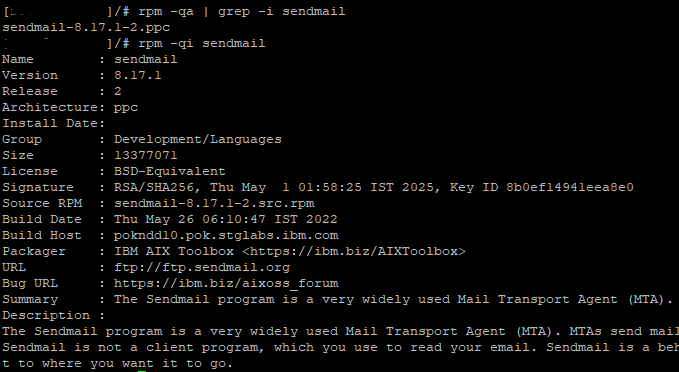
Once the installation completes successfully, verify that the expected Sendmail version is now active.
which sendmail
sendmail -d0.1
rpm -qi sendmail
These commands confirm the executable location, display the installed version, and verify package information.
Finally, repeat the feature verification performed earlier and confirm that the new binary includes capabilities such as SASLv2 and STARTTLS.
sendmail -d0.1 -bv root
At this stage, Sendmail is installed and capable of supporting modern authenticated SMTP communication. However, it has not yet been configured to communicate with an SMTP relay.
The next article focuses on configuring Sendmail as an SMTP client. We'll modify the required configuration files, define the SMTP relay host, enable authentication, and prepare the server for secure communication with Amazon Simple Email Service (AWS SES).
9. Common Installation Problems
Although installing Sendmail from the AIX Toolbox is generally straightforward, administrators may encounter dependency errors, version conflicts, or feature limitations depending on the AIX release and the packages already installed on the system.
Understanding these common issues before deployment can significantly reduce troubleshooting time.
| Problem | Possible Cause | Recommended Action |
|---|---|---|
| Missing db package | Required database library not installed. | Install the matching db RPM before installing Sendmail. |
| Missing cyrus-sasl | SMTP authentication library unavailable. | Install the appropriate Cyrus SASL package. |
| Missing openldap | Required shared libraries are unavailable. | Install the required OpenLDAP runtime package. |
| Missing libgcc | GCC runtime dependency not present. | Install the correct version of the GCC runtime libraries. |
| Package dependency failure | Required RPMs were installed in the wrong order. | Install prerequisite packages before installing Sendmail. |
| No SASLv2 or STARTTLS support | Older Sendmail binary. | Install the latest AIX Toolbox version. |
During our implementation, the installation required several supporting packages before Sendmail could be upgraded successfully. Resolving these dependencies first made the installation process smooth and ensured that the final binary included modern features such as SASLv2 and STARTTLS.
10. Production Deployment Checklist
Before introducing a new Sendmail installation into a production environment, perform the following verification steps.
| Verification | Status |
|---|---|
| Record the current Sendmail version. | ✔ |
| Verify the AIX operating system level. | ✔ |
| Download all required dependency packages. | ✔ |
| Confirm successful RPM installation. | ✔ |
| Verify SASLv2 support. | ✔ |
| Verify STARTTLS support. | ✔ |
| Confirm Sendmail daemon starts correctly. | ✔ |
| Document installed package versions. | ✔ |
Completing these checks before modifying the Sendmail configuration greatly reduces the risk of unexpected issues during SMTP relay integration.
11. Installation Best Practices
Installing Sendmail is only the first step. Following established best practices helps ensure a reliable and maintainable deployment.
- Create a backup of the existing Sendmail configuration before making any changes.
- Whenever possible, validate new packages on a development or test LPAR before deploying them to production.
- Download all required RPM dependencies in advance for offline environments.
- Verify compiled features after installation rather than assuming they are available.
- Keep a record of package versions for future upgrades and troubleshooting.
- Avoid editing sendmail.cf until the installation has been fully verified.
- Test basic Sendmail functionality before configuring SMTP authentication.
Many organizations maintain a dedicated test LPAR for validating operating system updates and open-source packages before deploying them to production. This approach minimizes risk while providing an opportunity to verify compatibility with existing applications.
12. Summary
At this stage, the AIX server has been prepared for modern SMTP authentication. Rather than immediately modifying configuration files, we first verified the existing environment, installed the required packages, confirmed dependency resolution, and validated that the new Sendmail binary supports the features required by modern SMTP providers.
| Completed Step | Status |
|---|---|
| Reviewed the existing Sendmail installation. | ✔ |
| Compared the native and AIX Toolbox versions. | ✔ |
| Verified compiled Sendmail features. | ✔ |
| Installed required dependencies. | ✔ |
| Installed the latest Sendmail package. | ✔ |
| Verified the installation. | ✔ |
| Prepared the server for SMTP authentication. | ✔ |
Key Takeaways
- The default Sendmail installation may not include the features required by modern SMTP providers.
- Always verify compile-time capabilities before beginning configuration.
- Install dependency packages before upgrading Sendmail.
- Validate the installation on a test system whenever possible.
- Configuration should begin only after the installation has been fully verified.
13. Frequently Asked Questions
Can I continue using the Sendmail version included with AIX?
Yes, provided it includes the functionality required for your environment. If your SMTP provider requires features such as SASL authentication or STARTTLS and the installed binary does not support them, upgrading to a newer build may be necessary.
Can I install the AIX Toolbox version on a production server?
Yes, but only after validating package compatibility, verifying dependencies, and following your organization's change management procedures.
Should I edit sendmail.cf immediately after installation?
No. First confirm that the installation completed successfully and that the binary supports the required features. Configuration should be performed only after these verification steps.
How can I confirm that Sendmail supports SMTP authentication?
Run sendmail -d0.1 -bv root and review the compiled features. Look for options such as SASLv2 and STARTTLS.
With Sendmail successfully installed and verified, the next step is to configure it as an SMTP client.
Article 4 – Configuring Sendmail as an SMTP Client on IBM AIX
In the next article, we'll configure the core Sendmail settings, explain the purpose of the sendmail.cf file, configure a SMART_HOST (SMTP relay), and prepare the server for authenticated communication before integrating with Amazon Simple Email Service (AWS SES).