What You'll Learn
- Why organizations use Amazon SES for SMTP relay.
- How Amazon SES SMTP authentication works.
- The difference between AWS credentials and SMTP credentials.
- Choosing the correct SMTP endpoint and port.
- Preparing Sendmail for SASL authentication.
- Understanding the configuration steps before modifying Sendmail.
Prerequisites
Before continuing, you should have completed the previous articles in this series.
- Article 1 – Understanding Email Architecture in AIX
- Article 2 – Understanding Sendmail in AIX
- Article 3 – Installing Sendmail on IBM AIX
- Article 4 – Configuring Sendmail as an SMTP Client
Your AIX server should already have the latest Sendmail package installed with SASLv2 and STARTTLS support.
1. Why Use Amazon SES?
Modern organizations rarely allow production servers to send email directly to Internet mail servers. Direct SMTP delivery can create security risks, increase the likelihood of messages being marked as spam, and make centralized auditing difficult.
Instead, servers forward all outgoing email to a trusted SMTP relay service. One of the most widely used cloud-based relay services is Amazon Simple Email Service (Amazon SES), which provides scalable, secure, and highly available email delivery.
Rather than communicating directly with Gmail, Outlook, or another destination mail server, your AIX server sends email to Amazon SES. Amazon SES then performs authentication, routing, retry handling, and final delivery.
Application
      |
      |
      v
mail / mailx
      |
      |
      v
Sendmail
      |
      |
      | SMTP + TLS
      |
      v
Amazon SES
      |
      |
      v
Internet
      |
      |
      v
Recipient Mail Server
      |
      |
      v
Recipient Mailbox
This architecture improves reliability while allowing Amazon SES to manage reputation, rate limiting, and communication with external mail providers.
Using Amazon SES allows hundreds of AIX servers to share a centralized, authenticated SMTP service without exposing each server directly to the Internet.
2. Understanding Amazon SES SMTP Authentication
One of the most common sources of confusion is the difference between AWS account credentials and Amazon SES SMTP credentials.
Many administrators assume that the AWS Management Console username and password can be used to authenticate Sendmail. This is incorrect.
Amazon SES uses a separate set of SMTP credentials that are generated specifically for SMTP authentication.
AWS Account
      |
      |
      v
IAM User
      |
      |
      v
Generate SMTP Credentials
      |
      |
      v
SMTP Username

SMTP Password
      |
      |
      v
Sendmail Authentication
These SMTP credentials are unique to Amazon SES and are designed specifically for mail clients and Mail Transfer Agents such as Sendmail.
Do not use your AWS Management Console password or IAM console password in the Sendmail configuration. Always use the SMTP username and SMTP password generated for Amazon SES.
3. Choosing the Correct SMTP Endpoint
Amazon SES provides regional SMTP endpoints. Your Sendmail server must connect to the endpoint that corresponds to the AWS Region where your SES resources are configured.
For example, if your Amazon SES instance is located in the Asia Pacific (Mumbai) Region, the SMTP endpoint is:
email-smtp...amazonaws.com
Other AWS Regions use different SMTP hostnames, but the configuration process remains the same.
Amazon SES supports several SMTP ports to accommodate different network environments.
| Port | Purpose | Recommended |
|---|---|---|
| 25 | Traditional SMTP | No |
| 465 | SMTP over SSL | Optional |
| 587 | SMTP Submission with STARTTLS | ✔ Recommended |
| 2587 | Alternative SMTP Submission | Supported |
For most enterprise AIX environments, port 587 is recommended because it supports STARTTLS encryption and is widely accepted by corporate firewalls.
Choose the Amazon SES endpoint that matches your AWS Region and use port 587 unless your organization's security policies require a different SMTP port.
4. Before Modifying Sendmail
Before editing any Sendmail configuration files, verify that the following prerequisites have been completed successfully.
- The latest Sendmail package is installed.
- SASLv2 support has been verified.
- STARTTLS support is available.
- The Sendmail daemon is running correctly.
- The Amazon SES SMTP endpoint is reachable from the AIX server.
- SMTP credentials have already been generated.
At this point, your AIX server is fully prepared for SMTP authentication. In the next section, we'll create the Sendmail authentication database, configure the required authentication files, and enable secure communication using SASL and TLS.
The next section focuses on the practical configuration of Sendmail. We'll create the authinfo file, generate the hashed authentication database using makemap, configure the required Sendmail directives, and prepare the daemon for authenticated communication with Amazon SES.
5. Creating the Authentication Database
Unlike traditional SMTP servers that accept mail from trusted hosts, Amazon SES requires every SMTP client to authenticate before it is allowed to send email.
Sendmail stores SMTP authentication information in a dedicated file named authinfo. Rather than embedding usernames and passwords directly inside sendmail.cf, authentication details are maintained separately and converted into a secure database that Sendmail reads during SMTP authentication.
Create the authentication file.
vi /etc/mail/authinfo

Add an entry similar to the following.
AuthInfo:email-smtp...amazonaws.com "U:YOUR_SMTP_USERNAME" "P:YOUR_SMTP_PASSWORD" "M:LOGIN"
Each parameter has a specific purpose.
| Parameter | Description |
|---|---|
| AuthInfo | Identifies the SMTP server to which these credentials apply. |
| I | SMTP authentication identity. |
| P | SMTP password generated by Amazon SES. |
| M | Authentication mechanism. Amazon SES commonly uses LOGIN. |
Replace the example values with the SMTP credentials generated from your Amazon SES console. Do not use your AWS Management Console password or IAM login password.
6. Building the Authentication Database
The authinfo file is only a plain-text source file. Sendmail does not read this file directly.
Instead, it uses a hashed database generated by the makemap utility.
makemap hash /etc/mail/authinfo.db \
< /etc/mail/authinfo
This command creates a database named:
/etc/mail/authinfo.db
Whenever changes are made to the authinfo file, the makemap command must be executed again so that Sendmail can read the updated information.
Editing authinfo alone is not enough. Always rebuild the authentication database after making changes.
7. Configuring sendmail.cf
With the authentication database prepared, the next step is configuring Sendmail so that it knows which SMTP server to contact and how authentication should be performed.
The following directives are the most important for Amazon SES integration.
DSemail-smtp...amazonaws.com
This directive defines the SMART_HOST that will receive every outgoing email.
Next, enable authentication features.
O AuthMechanisms=LOGIN PLAIN

O DefaultAuthInfo=/etc/mail/authinfo
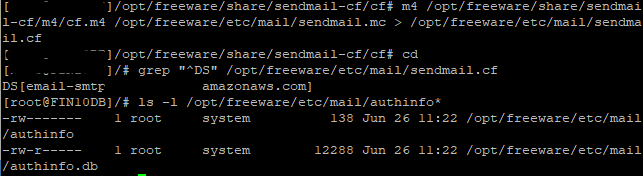
These settings instruct Sendmail to use the authentication database created earlier and advertise the supported SMTP authentication mechanisms.
| Directive | Purpose |
|---|---|
| DS | Defines the SMTP relay (SMART_HOST). |
| AuthMechanisms | Lists the supported authentication methods. |
| DefaultAuthInfo | Specifies the authentication database used during SMTP login. |
Once these directives are configured, Sendmail knows where to send email and which credentials should be used during authentication.
Before restarting Sendmail, review the configuration carefully for typing mistakes. Even a small spelling error in the relay hostname or authentication file path can prevent SMTP authentication from succeeding.
8. Enabling Secure SMTP Communication
Authentication credentials should never be transmitted across the network without encryption. Amazon SES therefore recommends using STARTTLS so that the SMTP session is encrypted before authentication begins.
The connection process follows this sequence.
Sendmail
      |
      |
      v
Connect to Amazon SES
      |
      |
      v
STARTTLS Negotiation
      |
      |
      v
Encrypted SMTP Session
      |
      |
      v
SMTP Authentication
      |
      |
      v
Email Delivery
Because STARTTLS is negotiated before authentication, the SMTP username and password remain protected while travelling across the network.
Whenever possible, use SMTP port 587 together with STARTTLS. This combination provides encrypted communication while remaining compatible with most enterprise firewalls and network security policies.
9. Reloading Sendmail
After updating the authentication database and modifying the Sendmail configuration, reload the daemon so that the new settings become active.
refresh -s sendmail
If a complete restart is preferred, stop and start the service using the System Resource Controller (SRC).
stopsrc -s sendmail

startsrc -s sendmail
Finally, verify that the service is running correctly.
lssrc -s sendmail
At this stage, Sendmail has everything required to establish an authenticated SMTP session with Amazon SES. The only remaining step is validating the configuration by sending test messages and troubleshooting any authentication or connectivity issues, which we'll cover in the final part of this article.
In the final part of this article, we'll send the first authenticated email through Amazon SES, verify successful SMTP authentication, inspect the mail queue, review common SMTP error messages, and troubleshoot issues such as 535 Authentication Credentials Invalid, 530 Authentication Required, STARTTLS failures, and relay connectivity problems.
10. Sending the First Authenticated Email
With Sendmail configured to authenticate with Amazon SES, it's time to verify that the configuration works correctly by sending a test email.
A simple test can be performed using the mail command.
/opt/freeware/sbin/sendmail -f xxx@serverdomain.com -Am -v xxx@domain.com From: xxx@serverdomain.com To: xxx@domain.com \
Subject: AWS SES SMTP Relay Validation Test \

Hi, \

This is a test email. \

Regards, \
Ashutosh \
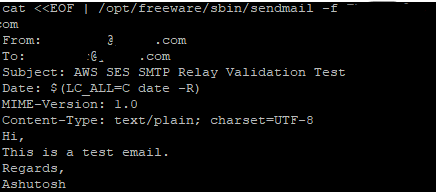
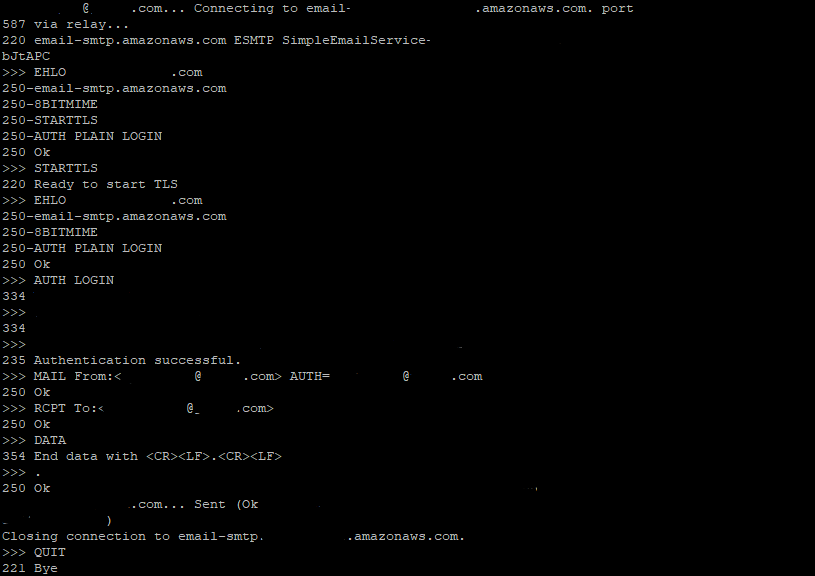
If the configuration is correct, Sendmail establishes an encrypted SMTP connection, authenticates using the configured SMTP credentials, submits the message to Amazon SES, and receives confirmation that the message has been accepted for delivery.
Application
      |
      |
      v
mail / mailx
      |
      |
      v
Sendmail
      |
      |
      v
STARTTLS
      |
      |
      v
SMTP Authentication
      |
      |
      v
Amazon SES
      |
      |
      v
Recipient Mail Server
      |
      |
      v
Recipient Mailbox
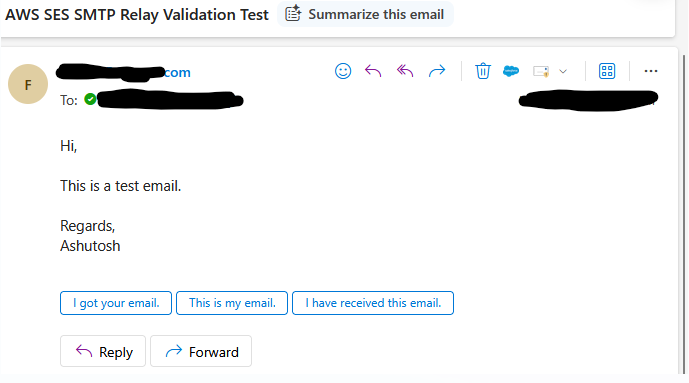
Amazon SES accepting a message means it has successfully received the email for processing. Final delivery to the recipient still depends on recipient policies, spam filtering, and mailbox availability.
11. Verifying Successful Delivery
After submitting a test message, verify that Sendmail processed the message successfully.
First, check whether any messages remain in the mail queue.
mailq
or
sendmail -bp
A healthy configuration normally results in an empty queue shortly after delivery.
Next, confirm that the Sendmail daemon is still running.
lssrc -s sendmail
If messages remain queued unexpectedly, review the system logs and verify SMTP connectivity before assuming an authentication problem.
12. Common Amazon SES SMTP Errors
When integrating Sendmail with Amazon SES, administrators frequently encounter a small number of SMTP authentication and connectivity errors.
| Error | Possible Cause | Recommended Action |
|---|---|---|
| 530 Authentication Required | SMTP authentication was not performed. | Verify the authentication configuration and restart Sendmail. |
| 535 Authentication Credentials Invalid | Incorrect SMTP username or password. | Regenerate Amazon SES SMTP credentials and rebuild the authinfo.db database. |
| 454 TLS Not Available | TLS negotiation failed. | Verify STARTTLS support and certificate configuration. |
| Connection Timed Out | Firewall or routing problem. | Verify network connectivity to the Amazon SES endpoint. |
| Host Unknown | DNS resolution failure. | Confirm that the SMTP endpoint resolves correctly. |
Most SMTP problems can be traced to one of three areas: authentication, network connectivity, or DNS resolution. Verifying these areas first usually resolves the issue quickly.
If Sendmail repeatedly retries delivery without success, inspect the mail queue before modifying the configuration. The queue often provides valuable information about why delivery is being deferred.
13. Production Readiness Checklist
Before using Amazon SES in a production environment, verify the following checklist.
| Verification | Status |
|---|---|
| Amazon SES SMTP credentials created. | ✔ |
| SMTP endpoint configured correctly. | ✔ |
| Authentication database generated. | ✔ |
| STARTTLS enabled. | ✔ |
| Sendmail restarted successfully. | ✔ |
| Test email delivered successfully. | ✔ |
| Mail queue empty after testing. | ✔ |
Completing these verification steps provides confidence that the Sendmail configuration is ready for production workloads.
14. Security Best Practices
- Protect the authinfo file using appropriate file permissions.
- Never store SMTP credentials in shell scripts.
- Always regenerate authinfo.db after changing credentials.
- Use STARTTLS whenever available.
- Monitor the Sendmail mail queue regularly.
- Rotate Amazon SES SMTP credentials periodically.
- Restrict access to Sendmail configuration files to administrative users only.
- Validate configuration changes on a non-production server whenever possible.
Store Amazon SES SMTP credentials securely and treat them like any other production password. Limit access to configuration files and maintain appropriate backup and recovery procedures.
15. Summary
Congratulations! At this stage, Sendmail has been fully configured to authenticate securely with Amazon SES using SASL and STARTTLS. Your AIX server is now capable of sending authenticated email through a trusted cloud-based SMTP relay.
| Completed Task | Status |
|---|---|
| Configured Amazon SES SMTP endpoint. | ✔ |
| Created the authentication database. | ✔ |
| Configured Sendmail authentication. | ✔ |
| Enabled encrypted SMTP communication. | ✔ |
| Validated email delivery. | ✔ |
| Reviewed common SMTP errors. | ✔ |
Key Takeaways
- Amazon SES requires dedicated SMTP credentials.
- Sendmail authenticates using the authinfo database.
- STARTTLS protects SMTP credentials during transmission.
- Always verify the mail queue after testing.
- Authentication, DNS, and network connectivity are the three most common causes of SMTP failures.
Although Sendmail is now successfully authenticating with Amazon SES, secure SMTP communication also depends on proper certificate validation. In the next article, we'll configure trusted Certificate Authority (CA) certificates, explain STARTTLS certificate verification, troubleshoot TLS handshake failures, and validate encrypted SMTP sessions using openssl s_client.